
Introducing http-helpers-ts: Tree-Shaking HTTP Constants for TypeScript
The Problem
The HTTP specification defines thousands of constants. Every HTTP API uses a subset of them, and in TypeScript, that means either writing magic values inline or defining them yourself:
if (method === "GET") {
  return {
    statusCode: 200,
    headers: { "Content-Type": "application/json" },
    body: JSON.stringify({ message: `Hello, ${name}!` }),
  };
}
After 15 years building software at scale, replacing magic values with named constants is muscle memory. But HTTP constants are not arbitrary values I invented; they are a well-defined, standardized set. Redefining them in every project I build is busywork. Surely someone had already solved this problem?
What's Already Out There
Since I was developing HTTP APIs using AWS Lambda + API Gateway, I wanted a library that also created minimized code bundles with tree-shaking (the process where a bundler removes unused exports from the final compiled output). However, among the currently published libraries that supported HTTP constants, I found that they roughly fell into three categories:
- Broad coverage, no tree-shaking. Packages like
http-constants-tscovered a broad range of HTTP constant types, but did not support tree-shaking, which caused my Lambda bundle to bloat. - Tree-shaking support, but only status codes. Packages like
@naverpay/es-http-status-codesand@opengg/status-esexplicitly supported tree-shaking, but they only cover HTTP status codes. I still had many other HTTP constants I had to deal with. - Possibly tree-shakeable, unclear coverage. A few packages looked like they might support tree-shaking and covered more types of constants, but it wasn't clear how complete or up-to-date their lists were.
That last point was what pushed me to build something new. I wanted a package sourced from a canonical, authoritative list, not just the values its author happened to know. None of the packages I found referenced one.
Introducing http-helpers-ts
So I built @evozong/http-helpers-ts, a TypeScript library of HTTP constants sourced from the IANA registry that supports tree-shaking. Since the library compiles away entirely, you can install it as a dev dependency:
npm install -D @evozong/http-helpers-ts
Here's what the Lambda handler looks like with it:
import * as http from "@evozong/http-helpers-ts";

if (method === http.HttpMethod_GET) {
  return {
    statusCode: http.HttpResponseCode_Ok,
    headers: { [http.HttpHeader_ContentType]: http.HttpMediaType_Application_Json },
    body: JSON.stringify({ message: `Hello World!` }),
  };
}
The compiled output contains only the constants the Lambda actually uses. Here's what that looks like (only 4 constants emitted, out of the hundreds in the library):
// node_modules/@evozong/http-helpers-ts/dist/methods.js
var HttpMethod_GET = "GET";

// node_modules/@evozong/http-helpers-ts/dist/status-codes.js
var HttpResponseCode_Ok = 200;

// node_modules/@evozong/http-helpers-ts/dist/header-names.js
var HttpHeader_ContentType = "Content-Type";

// node_modules/@evozong/http-helpers-ts/dist/media-types.js
var HttpMediaType_Application_Json = "application/json";

// src/handler.ts
if (method === HttpMethod_GET) {
  return {
    statusCode: HttpResponseCode_Ok,
    headers: { [HttpHeader_ContentType]: HttpMediaType_Application_Json },
    body: JSON.stringify({ message: `Hello World!` })
  };
}
The Design Process
Solving the Tree-Shaking Problem
Solving the Tree-shaking support problem was the critical requirement that dictated the architecture of the library, so I started there. In my Lambda API, I started by extracting all the HTTP constants into a separate TypeScript file within the Lambda project, importing them back into the handler, and experimenting with different ways of declaring them, checking what each approach produced in the compiled bundle.
The most natural approach was grouping values by type in an object (HttpMethods.POST, HttpMethods.GET), which is cohesive and readable, but it failed tree-shaking: wrapping constants in an object forces the bundler to treat the whole thing as a single unit, so use one value and you get all of them.
Individual export const declarations were the only way to give the bundler the granularity it needs. But this introduced two new problems:
- First, grouping was gone:
HttpMethod_GETandHttpMethod_POSThad no natural home together. With the object approach, GET and POST were naturally grouped by the object type:HttpMethods.GET. - Second, with hundreds of constants you can't import them individually, so you're forced to use an import alias:
import * as X from '...'. The import alias reduced readability if you used a long name.
The solution was to encode the grouping into the name itself as a prefix (HttpMethod_, HttpResponseCode_, HttpHeader_, HttpMediaType_), and recommend a short import alias to minimize the feel of duplication.
import * as http from '@evozong/http-helpers-ts'

let getStr = http.HttpMethod_GET;
In the example above, the word "http" appears twice, as the import alias and as part of the constant name, but it's semantically meaningful: the alias describes what the library is, and the prefix describes what the constant is. As a bonus, the prefix prevents naming collisions; a developer might define their own GET or Method_GET, but if they use the HTTP library, they'll likely not define HttpMethod_GET.
Creating an NPM Package
Once that was working, I extracted the constants into a standalone npm package, and the full set of constants came back in my bundle. It turns out that bundling a local file and bundling an npm package are not the same thing. Two additional properties in package.json were needed to tell the bundler this package is safe to tree-shake:
"sideEffects": false: signals that no file in the package has side effects, so unused exports can be safely dropped."type": "module": declares the package as an ES module, which is required for tree-shaking to work across package boundaries.
With those in place, the bundle was lean again. Publishing to npm also meant one package to reference from every Lambda, instead of copy-pasting the constants file each time.
Automating Publish on npmjs
Publishing a package on npmjs was straightforward after following the manual guide, but I wanted to automate it with a GitHub Workflow so every new version didn't require manual steps. It took several tries to get the workflow correctly working. A few gotchas I hit along the way:
- Automatically publishing to npmjs required setting
publishConfigtopublicinpackage.json:
{
  "name": "@evozong/http-helpers-ts",
  /* ... other settings ... */
  "publishConfig": {
    "access": "public"
  }
}
- The manual instructions use
npm publish --access public, but withpublishConfigset inpackage.json, that flag caused the workflow to fail. Usenpm publishin the workflow instead. - Don't use Node version 22; it returns a
404 Not Foundwithout explaining why. Use Node 20 or 24. Don't ask me why Node 22 doesn't work 🙃 I have no idea either. - Publishing to npmjs automatically triggers a provenance check, which requires certain attributes in
package.jsonto match exactly. The error message clearly explains what to add. - Every publish requires a new version number in
package.json. I looked into automating this but decided it wasn't worth the effort; bumping the version, tagging the commit, and pushing is my one remaining manual step.
IANA as Source of Truth
Tree-shaking addressed the bundling side, but I also wanted the library's values to be comprehensive, not just the values I happened to know. One package I found referenced MDN, which is a reasonable choice, but I kept looking.
Soon, I hit the jackpot with the IANA registry. IANA (Internet Assigned Numbers Authority) is the official body responsible for HTTP standards. What made it useful wasn't just the authority, but the registry itself: a structured, publicly accessible list of every registered HTTP value, with each entry linking back to the RFC that formalized it, and a clearly labeled "last updated" date on every page. That combination (complete, official, traceable, and timestamped) was exactly what I was looking for.
To actually use the IANA Registry, I still had to solve the problem of scale: Each HTTP type in the IANA registry has hundreds of values, so manually reading through the RFCs to write summaries wasn't practical. I used GenAI to parse the registry pages and read through the referenced RFCs, generating a 1-2 sentence summary for each constant, and spot-checked the results against the source RFCs. Every constant in the library ships with inline documentation - a plain-English description and a direct link to its RFC - visible in your IDE as a hover tooltip:
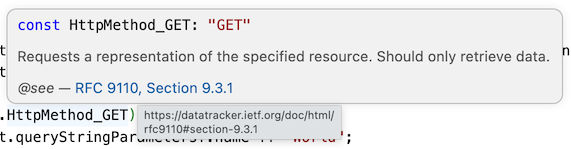
Finally, for long-term maintainability, I copied the "Last Updated" date from each Registry page into the library's source files, which makes future maintenance straightforward: if the date in the source doesn't match the date on the IANA page, the file needs to be regenerated.
What's Next
With the library published, I can finally eliminate the busywork from my HTTP APIs.
As I build more with Lambda, I'll add more IANA constant types to the library as I need them. If you want to contribute, Pull Requests are welcome; IANA defines far more HTTP values than the four types currently supported in the library.
If you're building TypeScript services or Lambda functions and want to stop writing magic strings, give @evozong/http-helpers-ts a try.